Here are two very useful commands to see available memory and hard drive space on linux
To see available memory we will use free
Yo see hard drive usage we will use df
Here are two very useful commands to see available memory and hard drive space on linux
To see available memory we will use free
Yo see hard drive usage we will use df
Thanks to mono we can run asp.net on our linux machines (i have to test some asp.net code), to do that we will use XSP, here the description took it from mono website.
XSP is a standalone web server written in C# that can be used to run your ASP.NET applications with minimal effort. XSP works under both the Mono and Microsoft runtimes. The code is available from our download page (look for XSP web server) or from the Anonymous SVN repository (module name: xsp).
To nstall it:
Once installed, just start XSP from the directory where your code is located, after that you can browse to http://localhost:8080 to see your web pages
Today i have to use c# to crypt some data using 3des, so here is a pretty basic example to do it, i test it using mono.
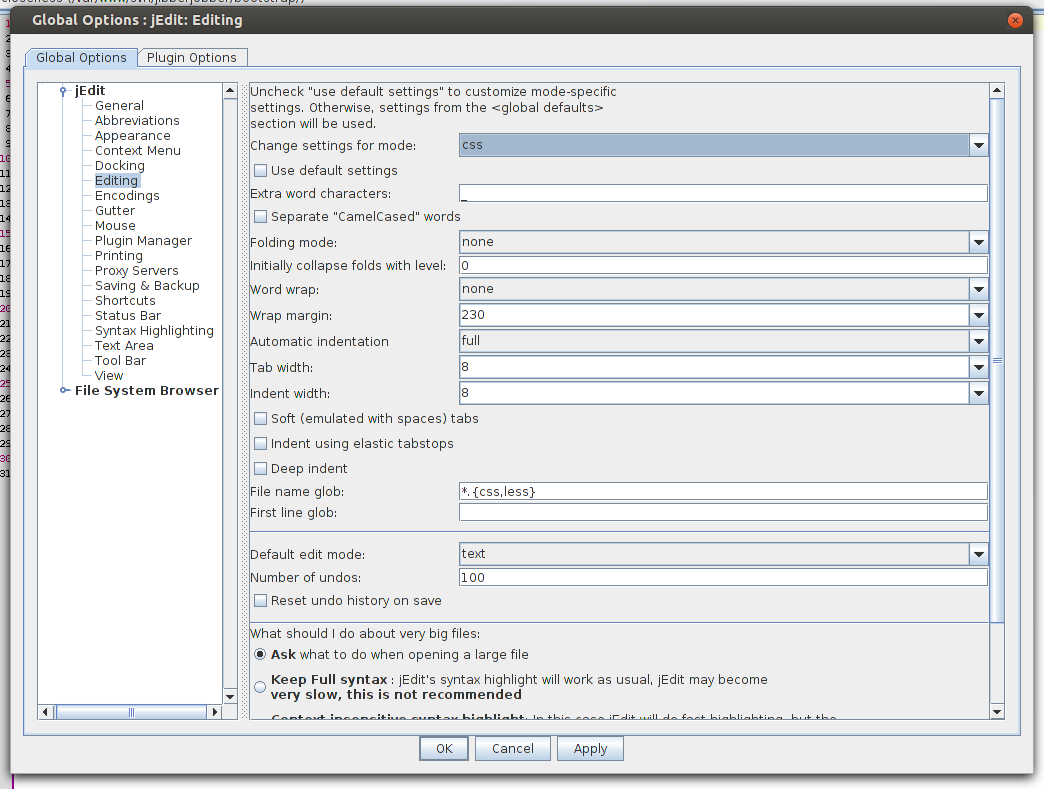
When you try to edit a less file on jedit, by default there is no color scheme at all, that makes editing css files extremely hard.
To change the way jedit color code the actual file go to “Utilities > Buffer Options” and on “Edit mode” select the color scheme to css.

If you don’t want to do these each time you edit a less file, lets tell jedit to treat *.less files as css files, to do this, “Utilities>Options” and then choose “Editing” on “Change settings for mode” select css, then uncheck “use defaul settings” and chane “File name glob” to “*.{css,less}”.
If your website is being attacked by spammers, you may want to block those users from your website. first thing we will do is to see how many connection by IP we have in our server, we will do this using netstat.
Once we have the IP address to block, we will use .htaccess to block those ip address like:
Today i found another free icon set, the brightmix iconset, what is must interesting about it is the license, the WTFPL license wich allows you to do whatever you want with them.

I have always liked a lot the Tango Icon Set, and starting from version 0.8.90 they are public domain, before these release they used to be Creative commons share a like, so if you like these icons now you can use them for your own projects
If your website is looking good on IE7 but on IE8 it looks like crap, it’s soved just adding one line of code to the header of your website, so it looks like IE7
If you want to embed a PDF file or a Powerpoint presentation on your site, a pretty easy way to do it, is just go to https://docs.google.com/viewer, introduce the pdf url, click on “Generate Link” and you will get a url to share with your users, where they can see the pdf file on the web or get the html code to embed on your web site
If you want to create the html code on you own is pretty easy just insert an iframe that points to http://docs.google.com/viewer and pass two parameters url=http://yousite.com/pdfile and embed=true and that’s it now you have a pdf embeded on your site
PHP Cheat Sheet (V2) Creative Commons License (Attribution, Non-Commercial, Share Alike).
If you are getting an annoying message like this
“Internet Explorer cannot open the Internet site”
“Operation aborted”
When trying to see a web page that contains a google map.
And right after the message pop ups Internet Explorer shows an empty page here are some tips to help you fixing this issue
First thing you’ll have to do. Is to move all the code used to generate the map to a function and call it once the page is loaded
If you are using prototype you can use
Or you can add an onload attribute to your body tag
If you are using polylines you should add vml namespace to your header and should look like this
Loading the javascript needed to generate the map as an external file , and adding defer attribute so internet explorer will wait until it loads the page before executing the Javascript. It has the same effect than moving your JS code to the bottom of the page.
It can be also a problem with a base tag messing wiht IE more info on
http://www.shauninman.com/archive/2007/04/13/operation_aborted